.svg)


.svg)
- Corporate coworking software manages employee access to third-party flex spaces, not the spaces themselves
- Look for budget controls, multi-location analytics, and HRIS integrations before anything else
- The market has split: operator tools vs. enterprise program management platforms
- ROI comes from real estate savings and measurable employee engagement gains
- Implementation fails without clear policies, governance, and change management
Corporate coworking program software helps enterprise teams manage employee access to flexible workspaces across cities, countries, and time zones. It's a different category from the tools coworking operators use to run their buildings. If you're evaluating platforms to launch or scale a corporate coworking program, this guide breaks down what matters, what doesn't, and which tools are worth your time in 2026.
What corporate coworking program software actually is
There's a naming problem in this space. Search for "coworking software" and you'll mostly find tools built for space operators: membership billing, access control, community management. That's not what you need if you're running a corporate program.
Corporate coworking program software sits on the employer side. It gives your people access to a network of third-party workspaces, while giving you visibility into who's booking what, where, and how much it costs. Think of it as the management layer between your company and the thousands of coworking spaces your employees might use.
The core capabilities fall into a few buckets: workspace discovery and booking, budget controls and approval workflows, utilization analytics, and integrations with your existing HR and calendar tools. The best platforms also handle multi-location management without requiring you to negotiate individual deals with every coworking brand in every city.
This distinction matters because choosing an operator tool when you need a program management platform is one of the most common (and expensive) mistakes workplace teams make.
Why enterprises are investing in coworking programs now
The shift isn't subtle. Corporate coworking hit $45 billion in 2025, making it the largest segment of the flexible workspace market. That's not freelancers renting hot desks. That's companies buying access at scale.
Three forces are driving this. First, real estate math has changed. Hybrid schedules mean your headquarters is half-empty most days, and maintaining satellite offices in every city where you have employees doesn't pencil out. Second, employer-sponsored memberships have become the dominant share of new coworking growth, reflecting how quickly workspace access has shifted from an individual perk to a company benefit. The expectation that companies provide workspace access, wherever employees are, has become table stakes for talent.
Third, the supply side caught up. The U.S. coworking footprint has continued expanding past 160 million square feet, with thousands of spaces now available in cities where enterprises have distributed employees. There are enough quality spaces in enough cities to make a corporate program viable at scale.
The result is a new line item in the workplace budget that didn't exist five years ago. And like any meaningful budget line, it needs software to manage it. Companies rethinking their hybrid workplace strategy are finding that coworking programs fill the gap between "everyone comes to HQ" and "figure it out yourself."
Key features to look for in corporate coworking software
Not every platform does the same things. Here's what separates enterprise-grade tools from glorified booking apps.
Budget controls and governance. This is non-negotiable. You need per-employee spending caps, team-level budgets, location-based rules, and approval workflows. Without these, your coworking program becomes an open credit card with no statement.
Network breadth and quality. How many spaces can your employees actually book? Are they vetted? A platform with 500 spaces sounds fine until you realize none of them are in Austin, where 200 of your engineers live. Geographic coverage matters more than raw numbers, but raw numbers matter too.
Analytics and reporting. You need to know utilization rates, spend per employee, popular locations, booking patterns, and whether people are actually showing up to the spaces they reserve. This data feeds directly into your corporate real estate strategy and helps you decide where to invest in dedicated space vs. flex.
Integrations. If the platform doesn't connect to your HRIS, calendar, Slack, and SSO, adoption will stall. Employees won't use a tool that lives outside their daily workflow. The build vs. buy decision often comes down to how well a platform fits your existing stack.
Employee experience. The booking flow needs to be dead simple. If it takes more than 60 seconds to find and reserve a desk, people will just work from home. Look for mobile apps, map-based search, and the ability to see where teammates are working.
Top corporate coworking program platforms for 2026
Here's where it gets honest. I'm evaluating seven platforms, and yes, Gable is one of them. I'll call out what each does well and where it falls short.
Gable On-demand
Best for: Enterprise teams managing a blend of owned offices and on-demand flex spaces globally.
Gable's On-Demand product gives employees access to 20,000+ coworking spaces across 900+ cities. What sets it apart is that it's not just a coworking booking tool; it's part of a broader workplace platform that also handles desk booking in your own offices, event management, and visitor management. That means one dashboard for your entire workspace portfolio.
Standout features include granular budget controls (per-employee, per-team, per-location), a Live Team View that shows where colleagues are working, and AI-powered analytics. The Gathering Report tracks whether on-demand bookings are actually driving team collaboration, not just individual desk usage.
Pricing: SaaS subscription; contact for enterprise pricing.
Integrations: Slack, Google Calendar, Outlook, major HRIS platforms, SSO.
Limitation: The breadth of the platform means there's a learning curve for admins who only need basic booking.
LiquidSpace
Best for: Companies focused primarily on on-demand and short-term office space, especially in the U.S.
LiquidSpace has been in the flex space game for over a decade. Its marketplace connects companies with coworking spaces, private offices, and meeting rooms. The platform handles everything from day passes to multi-month commitments.
Standout features include a strong U.S. network, flexible lease terms, and a managed marketplace model where LiquidSpace handles negotiations. The platform is positioned around helping companies achieve meaningful cost reductions through flex transitions in key markets.
Pricing: Transaction-based; varies by space type and commitment length.
Integrations: Limited compared to full workplace platforms.
Limitation: Primarily a marketplace. Doesn't offer owned-office management, so you'll need a separate tool for HQ desk booking.
OfficeRnD
Best for: Companies that also operate their own coworking or flex spaces internally.
OfficeRnD started as operator software and has expanded into hybrid workplace management. It's a strong choice if you run internal flex spaces (like innovation hubs or satellite coworking floors) alongside third-party access.
Standout features include resource booking, floor plan management, and member management tools that work for both internal and external spaces.
Pricing: Tiered SaaS model starting around $139/month for basic plans.
Integrations: Zapier, Slack, Microsoft Teams, various access control systems.
Limitation: The operator DNA shows. Enterprise program management features (budget controls, multi-city analytics) aren't as mature as purpose-built corporate tools.
Optix
Best for: Mid-market companies running smaller coworking programs or managing a handful of flex locations.
Optix offers a clean, mobile-first booking experience. It's popular with coworking operators, but its white-label capabilities make it usable for companies that want a branded booking experience for employees.
Standout features include a strong mobile app, automated billing, and community features that encourage interaction between members.
Pricing: Starts at $149/month per location.
Integrations: Stripe, Zapier, various door access systems.
Limitation: Per-location pricing gets expensive fast for enterprises with employees in dozens of cities. Better suited for companies managing a few dedicated flex locations than a global on-demand program.
Archie
Best for: Small to mid-size companies looking for straightforward coworking management with a modern interface.
Archie positions itself as an all-in-one workspace management platform. It handles desk booking, meeting room reservations, and basic analytics with a user-friendly design.
Standout features include an intuitive admin dashboard, visitor management, and floor plan visualization.
Pricing: Tiered plans; contact for enterprise pricing.
Integrations: Google Calendar, Outlook, Slack.
Limitation: Network access is limited compared to marketplace-style platforms. You'll need to bring your own coworking partnerships or use it primarily for internal space management.
Nexudus
Best for: Organizations running their own coworking spaces who also want to offer members access to a broader network.
Nexudus is one of the most established coworking management platforms globally. Its strength is in operating coworking spaces, with deep features for billing, CRM, and community management.
Standout features include a global partner network (NexNetwork), extensive customization, and strong API access for custom integrations.
Pricing: Starts around $29/month per location for basic plans; scales with features.
Integrations: Extensive API, Zapier, various payment and access control systems.
Limitation: Built for operators, not corporate program managers. If you don't run your own spaces, most of the feature set won't apply to you.
Deskworks
Best for: Budget-conscious organizations managing a small number of coworking locations.
Deskworks offers straightforward coworking management at a lower price point. It covers the basics: reservations, billing, member management, and basic reporting.
Standout features include simplicity and affordability. It does what it says without unnecessary complexity.
Pricing: Lower-cost SaaS model; contact for details.
Integrations: Limited; primarily standalone.
Limitation: Minimal enterprise features. No multi-location analytics, limited budget controls, and few integrations. Not built for corporate program management at scale.

Evaluating coworking software is one thing. Getting budget approval is another. This guide walks through the framework your CFO actually wants to see.
Read the guide
How to choose the right platform for your organization
The right tool depends on what you're actually trying to do. That sounds obvious, but I've seen plenty of teams buy operator software when they needed a corporate program tool, or vice versa.
Start with your workspace model. If you're managing a mix of owned offices and on-demand flex, you want a unified platform. Running two separate systems (one for HQ desk booking, one for coworking access) creates data silos and doubles admin work. If you're purely on-demand with no owned offices, a marketplace platform might be enough.
Consider your scale. A company with 50 employees in two cities has different needs than one with 5,000 employees across 30 countries. Per-location pricing models break down fast at enterprise scale. Look for per-user or flat-rate models if you're large and distributed.
Evaluate the network, not just the software. The prettiest dashboard in the world doesn't help if there aren't quality spaces where your people live. Ask vendors for a coverage map and cross-reference it against your employee distribution. This is especially critical for teams managing a hub and spoke model where satellite access needs to be smooth.
Test the employee experience. Have five employees try booking a space. Time it. If anyone gets confused or gives up, that's your adoption rate preview. The best workplace technology disappears into the workflow; the worst creates a new workflow nobody asked for.
Check the analytics depth. Can you see spend by team, by location, by month? Can you identify underused locations or over-budget departments? Can you export data to feed your real estate planning? If the answer to any of these is no, you'll outgrow the tool within a year.
Corporate coworking software ROI: what the numbers actually show
The business case for corporate coworking programs is straightforward, but only if you measure it properly.
On the cost side, companies save $11,000 to $13,000 annually by using coworking spaces instead of traditional leases in major metros. That's a compelling number, but it assumes you're actually reducing your lease footprint, not just adding coworking on top of existing space. The software's analytics need to show you where to make those cuts.
On the engagement side, coworking users consistently report higher satisfaction and lower isolation than employees limited to either an at-home setup or a single office. Take the specific percentages you'll see in vendor blog posts directionally rather than literally. But the signal is clear: giving people workspace options improves how they feel about work.
The harder ROI to measure is retention. Employees who have flexibility in where they work are less likely to leave, but isolating that variable from everything else that affects turnover is tricky. The best approach is tracking workplace ROI metrics holistically: real estate cost per employee, program utilization rates, engagement survey scores, and voluntary attrition in program participants vs. non-participants.
One thing I'd push back on: don't build your business case purely on cost savings. The real value is optionality. A coworking program lets you enter new markets without signing leases, support employees who relocate, and scale headcount without proportional real estate growth. That flexibility has a value that's hard to put in a spreadsheet but easy to feel when you need it.
Gable On-Demand connects your employees to coworking spaces in 900+ cities, with the budget controls and analytics enterprise teams need.
Learn more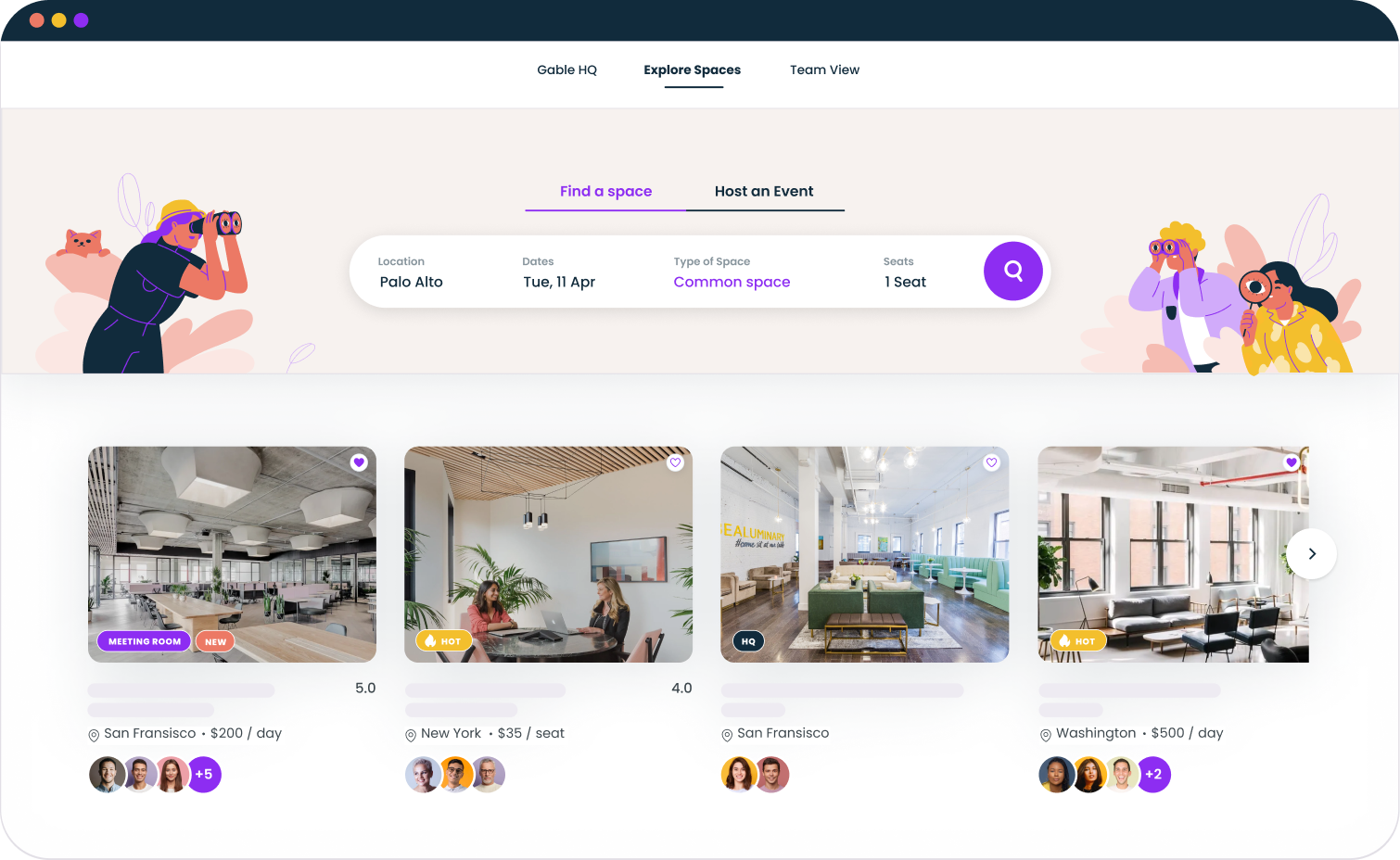
Implementation best practices and common pitfalls
Buying the software is the easy part. Rolling it out without creating chaos is where most teams stumble.
Define your policy before you configure the tool. What's the monthly budget per employee? Can anyone book, or do managers approve? Are there geographic restrictions? Are day passes allowed, or only monthly memberships? These aren't software questions; they're workplace strategy questions. Answer them first, then configure the platform to enforce them.
Start with a pilot. Pick one team or one region. Run the program for 60 to 90 days. Measure utilization, gather feedback, identify friction points. Then expand. Companies that launch globally on day one almost always end up with low adoption and high confusion.
Communicate the "why," not just the "how." Employees don't care about your real estate optimization goals. They care about having a great place to work near their home, or a space to meet their team without commuting to HQ. Frame the program around employee benefit, not corporate efficiency.
Set up governance early. Assign a program owner. Define escalation paths for budget overages. Create a feedback loop so employees can flag bad spaces. Without governance, your coworking program will drift into either underuse (nobody knows it exists) or overspend (everyone treats it like a perk with no limits).
Watch for the most common mistake: launching without integrating the coworking program into your broader workplace scheduling ecosystem. If coworking bookings live in one system and office bookings live in another, you'll never get a complete picture of how your people use space.
Picking the right tool comes down to knowing what you're solving for
Corporate coworking program software is a young category, and the tools are still sorting themselves into distinct lanes. Some are operator platforms adding corporate features. Some are corporate platforms adding coworking access. A few were built from the ground up for the enterprise program management use case.
The best advice I can give: don't start with the software. Start with the problem. Are you trying to reduce real estate costs? Support a distributed workforce? Improve employee satisfaction? Attract talent in new markets? The answer shapes which features matter and which platforms deserve a demo.
Whatever you choose, make sure it gives you data. The companies getting the most value from coworking programs aren't the ones with the biggest networks or the fanciest apps. They're the ones that can see exactly what's working, what's not, and where to invest next.
From booking to budgets to analytics, Gable gives workplace teams a single platform for offices and on-demand flex spaces.
Get a demo