.svg)


.svg)
- Office desk allocation software decides who sits where, assigning fixed desks, flexible pools, and team neighborhoods, and enforcing those rules as people book day to day.
- Gable is the top pick: it handles allocation, booking, neighborhoods, and utilization analytics in one platform, across desks, rooms, and sites.
- Allocation software manages assignment and policy; it is not a full facilities suite or a communication tool, so set expectations accordingly.
- Pricing runs from about $2.50 per user per month to enterprise quotes, with most enterprise tools quote-based.
- The setup choices, fixed versus flexible ratio, neighborhoods, and rules, matter more to success than the feature list, and you should measure utilization to know it is working.
Desk allocation is the quiet layer beneath every flexible office. It is the set of decisions about who gets an assigned desk, which areas are shared pools, how teams are grouped, and what rules govern booking. Done in a spreadsheet, it falls apart the moment headcount or policy changes. Office desk allocation software turns those decisions into a system that assigns, enforces, and reports, so the floor reflects how the company actually works.
This guide covers the six best office desk allocation software tools for 2026, what this category does and does not do, and the setup choices that decide whether it works.
What office desk allocation software does
Desk allocation software manages the assignment layer of the workplace. It defines which desks are permanently assigned, which sit in flexible pools, and which belong to team neighborhoods. It enforces those definitions when employees book, so a flex desk cannot be claimed permanently and a team area stays with its team. And it reports on how the allocation performs, so you can adjust the mix.
What it does not do is just as important to know. It is not a full integrated workplace management suite with maintenance and asset modules, though some tools extend toward that. It is not a communication or scheduling platform. And it is not a substitute for policy: the software enforces rules, but you still have to set sensible ones. For a related pattern, see our guide to neighborhood seating in the office.
The problems that make desk allocation software worth buying
Companies move off spreadsheets and manual seating charts when the manual approach starts costing real time and trust. Reorganizations mean reseating hundreds of people by hand. New hires arrive with no clear desk. Flexible desks are quietly treated as permanent by whoever gets there first. Teams that should sit together are split across floors because no one tracked the plan. And leadership asks how much space is actually used and gets a shrug. Allocation software removes each of those by holding the seating model in one place and enforcing it automatically.
6 best office desk allocation software tools
We weighed allocation and seat-management depth, fit for large and multi-site offices, pricing transparency, and verified user reviews. Gable leads as the all-in-one platform; the rest fit specific needs.
1. Gable
Gable manages desk allocation alongside booking, neighborhoods, room scheduling, and visitor management in one platform. Admins define assigned desks, flexible pools, and team zones, set permissions and budgets, and watch utilization analytics to tune the mix, while employees book from Slack, Microsoft Teams, or mobile. For companies that want allocation plus the data to right-size space, it replaces separate tools with one office management software platform.
- Assigned desks, flexible pools, and team neighborhoods
- Desk and room booking with real-time floor plans
- Permissions, budgets, and cross-site utilization analytics
- Compliance: SOC 2 Type II, GDPR, SSO, RBAC, AES-256 encryption
- Pricing: Office Management from $2.50 per user per month; all-in-one custom
- G2 rating: 4.5/5 (131 reviews)

Our roundup of the best desk booking software breaks down features, pricing, and fit, so you can see how allocation and booking tools stack up.
Read the guide
2. OfficeSpace Software
OfficeSpace is strong on detailed floor-plan allocation, stack planning, and scenario modeling, fitting large facilities teams that reallocate space often and plan moves on CAD-grade plans.
- Allocation and stack planning on detailed floor plans
- Move and scenario management
- Advanced utilization analytics
- Pricing: quote-based
- G2 rating: 4.7/5 (126 reviews)
3. Robin
Robin focuses on an employee-friendly experience, with assigned and flexible desks, interactive maps, and calendar integration, which helps allocation changes land without friction.
- Assigned and flexible desk management
- Interactive maps and calendar sync
- Workplace analytics dashboards
- Pricing: quote-based
- G2 rating: 4.4/5 (211 reviews)
4. Envoy
Envoy combines desk allocation and booking with visitor and security features, fitting offices that want seating and reception in one product. Pricing scales by module.
- Assigned and flexible desk management
- Visitor management and security workflows
- Occupancy analytics
- Pricing: Workplace from about $3 per user per month; modules separate
- G2 rating: 4.4/5 (163 reviews)
5. Skedda
Skedda handles desk and space allocation with custom rules at a predictable, per-space price, fitting single and mid-size offices that want straightforward seat management without enterprise overhead.
- Desk and space allocation with custom rules
- Per-space pricing that stays predictable as headcount grows
- Simple admin and self-serve setup
- Pricing: from $99 per month (per-space tiers)
- G2 rating: 4.8/5 (283 reviews)
Gable manages assigned desks, flexible pools, and neighborhoods across every site, with the utilization analytics to get the mix right.
Explore Gable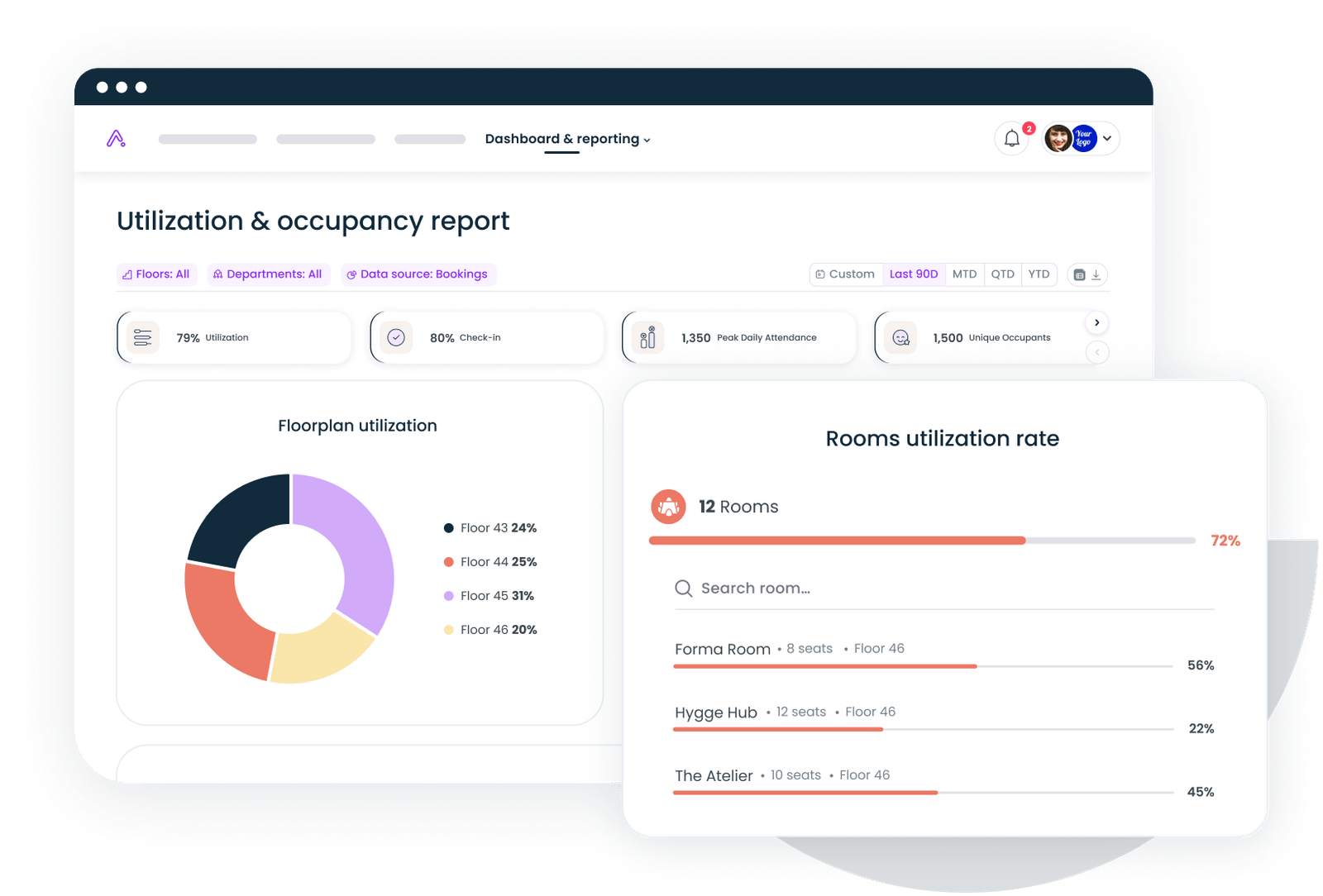
6. FM:Systems
FM:Systems pairs seat and space management with facilities tools, fitting regulated and campus environments that need allocation alongside maintenance and compliance reporting.
- Seat and space management for large portfolios
- Facilities and maintenance integration
- Compliance-oriented reporting
- Pricing: quote-based
- G2 rating: 4.2/5 (26 reviews)
The setup decisions that determine whether desk allocation actually works
The configuration choices matter more than the feature list. Decide the ratio of assigned to flexible desks based on real attendance, not on what feels safe, because too many assigned desks waste the space sharing was meant to recover. Define team neighborhoods so groups keep sitting together. Set booking rules, limits, windows, and check-in, so flexible desks stay flexible. Build accessibility and accommodation into assignments from the start rather than as exceptions. And phase the rollout, piloting one floor or team before going wide. Get these right and the software runs itself; get them wrong and no feature list will save the rollout.
How to measure whether your desk allocation is working
Track a few numbers from the start so you catch problems early. Watch desk utilization, the share of desks actually used on a typical day, and aim to push it into a healthy band rather than leaving floors half empty or over capacity. Watch the assigned-versus-flexible split against real attendance. Watch no-show rates on flexible desks. Watch how often teams sit in their neighborhood versus scattered. And watch booking adoption, the share of presence that runs through the system. If utilization is rising and adoption is high, the allocation is working; if not, the numbers tell you exactly what to adjust.
Book a demo and we will show how Gable handles desk allocation, from neighborhoods to flexible pools to portfolio-wide utilization data.
Get a demo