
.svg)


.svg)
- 52% of companies now mandate three or four office days a week
- Informal coordination stops working somewhere around 20 people
- Four models cover most teams: fixed, flexible, team-anchored, activity-based
- The most common failures are peak-day crowding and empty Fridays
- Review scheduling data quarterly and adjust the policy like a product
Hybrid office scheduling is how a company decides who comes in, on which days, and what happens when everyone picks Tuesday. The stakes have grown: 52% of organizations now mandate three to four office days a week, per JLL's 2026 corporate real estate outlook, and a hybrid work model that looks fine in a policy doc can still produce a packed office on Wednesday and a ghost town on Friday.
Why hybrid scheduling breaks down without a system
Small teams coordinate office days in a group chat, and it works. Someone posts "in tomorrow?", a few thumbs-up appear, and the right people show up. Past roughly 20 people, that method quietly fails: nobody can hold the full picture of who's in when, and the office day loses its point, which was seeing the people you needed to see.
The failure shows up in three places. Employees commute in and find their team stayed home. Desks run out on peak days while the weekly average says the office is half empty. And managers can't answer basic questions (is our anchor day working? do we have room to grow?) because attendance lives in chat threads and memory.
The math explains why this matters more than it used to. McKinsey found office visits have stabilized at about 30% below pre-pandemic frequency, so every office day now carries more coordination weight. When people come in less often, an uncoordinated day wastes a larger share of everyone's in-person time.
The main hybrid scheduling models and how they differ
Four models cover most hybrid teams. We compare eight variants in detail in our hybrid work schedule guide; here's the short version and who each fits.
- Fixed schedules. Everyone follows the same pattern, like Tuesday through Thursday in office. Easiest to plan space around and best for companies that want predictable collaboration, at the cost of flexibility for roles that don't need it.
- Flexible schedules. Employees choose their days, usually against a minimum like "any three per week." Best for autonomous, senior, or distributed teams. The trade-off is that overlap happens by luck unless a booking system makes plans visible.
- Team-anchored schedules. Each team sets its own anchor days and members plan around them. This is the middle path most mid-sized companies land on: teams get in-person time that suits their work, and the office gets spread demand instead of a single company-wide peak.
- Activity-based schedules. People come in for specific work (sprint planning, onboarding, client sessions) rather than fixed days. Best for project-driven organizations, and the hardest to run without software, since demand shifts week to week.
The pattern behind all four: structure earns its keep as coordination needs grow. Stanford's research found hybrid arrangements cut resignations by 33% with zero effect on productivity, so for most companies the open question is which coordination model fits how their teams collaborate.

We compared the leading hybrid office scheduling platforms on features, pricing, and team fit.
See the comparison
The scheduling challenges most hybrid teams hit in practice
Every model runs into the same friction points once it's live.
- Peak-day crowding. Tuesday through Thursday demand outstrips supply while Mondays and Fridays sit empty. Global utilization averaged 53% in 2026 per CBRE, and that average hides exactly this kind of midweek spike.
- Meeting room scarcity. Room demand grows faster than desk demand because people come in to meet. Cushman & Wakefield tracked meeting room bookings up 22% in the Americas in a single year.
- Coordination misses. The engineer comes in Monday; her product counterpart picked Thursday. Both technically complied with the policy, and the week's one cross-team conversation happened on Slack anyway.
- No-shows and ghost bookings. Desks get reserved and abandoned, so the floor looks full in the system and half empty in person.
- Fairness disputes. When desks or parking run short, whoever books fastest wins, and that erodes trust in the whole schedule.
None of these fix themselves with a sterner policy memo. They're visibility and allocation problems, which is why they respond to tooling.
The tools and features that make hybrid office scheduling work
Hybrid office scheduling software does three jobs: it shows who's coming in, books the space to match, and reports how the schedule performs. Our guide to workplace scheduling software covers the category in depth; when evaluating, weight these features by team size and model.
- Schedule visibility (every team, every model): people set their office days and see teammates' plans in the tools they already use, like Slack or Teams. This single feature converts a mandate into coordination. Gable's live team view is built on this idea, and our booking data shows why it matters: 72% of bookings are for team gatherings, so people come in for each other rather than for the desk.
- Desk and room booking (50+ people, any model): reservations with check-in enforcement, so no-shows release automatically.
- Anchor-day support (team-anchored model): team-level recurring days with capacity warnings before two large teams claim the same Wednesday.
- Utilization reporting (workplace and RE teams): actual attendance against policy, per day and per team, so you adjust the schedule from evidence instead of anecdote. The same JLL research puts average utilization at 54% against targets of 79%, and reporting is how you find your own version of that gap.
- Capacity rules (space-constrained offices): booking limits, priority groups, and waitlists that settle the fairness question by rule instead of by speed.
Gable Offices gives your team desk booking, schedule visibility, and attendance insights in one place.
Learn more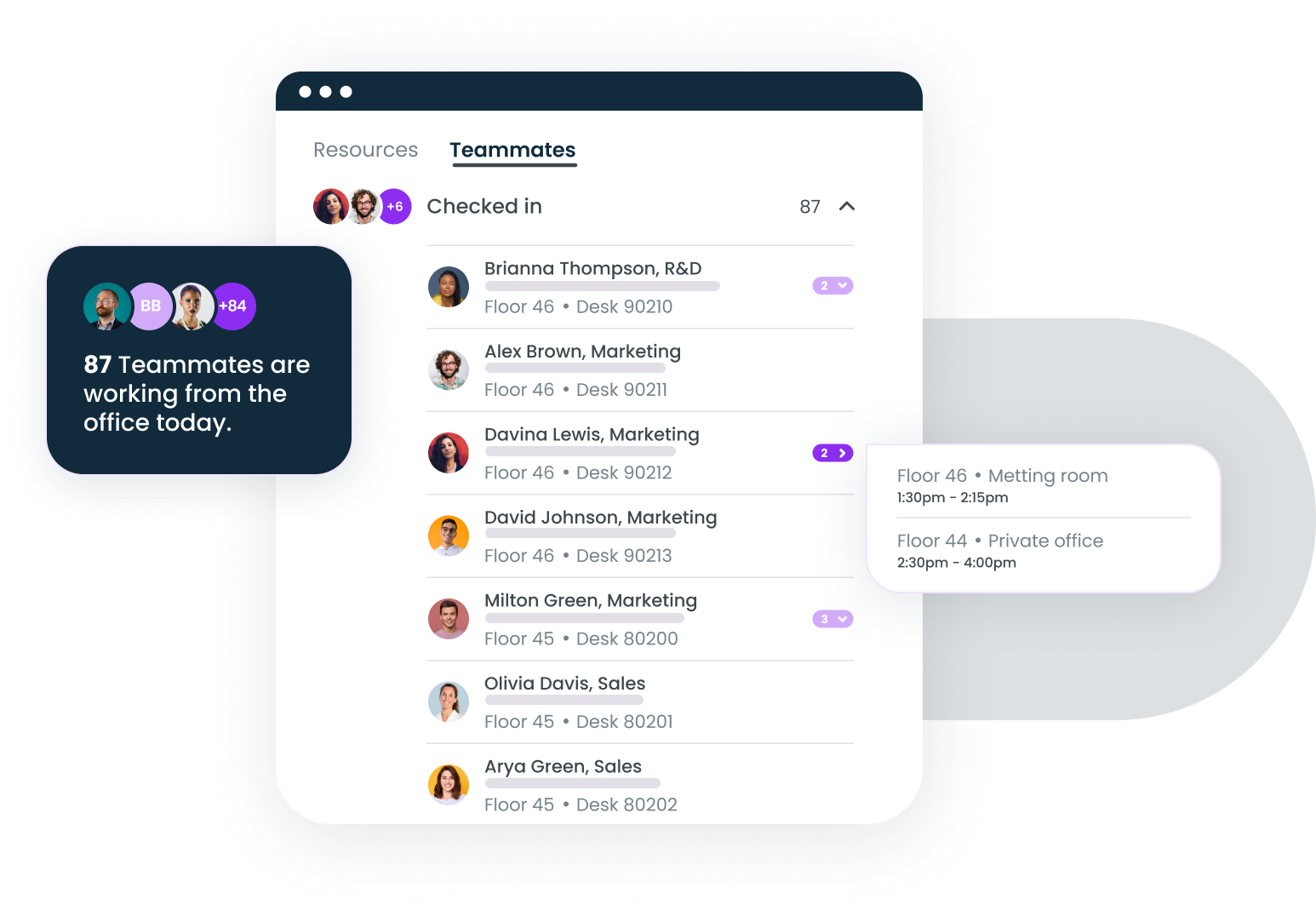
How to build and evolve a hybrid scheduling policy
A scheduling policy is a set of decisions, and the good ones get made in this order.
- Decide what the office is for. Collaboration-heavy teams need overlap; deep-work cultures need quiet capacity. This determines everything downstream.
- Pick the lightest model that achieves it. Start team-anchored unless you have a strong reason for company-wide fixed days. You can tighten a loose policy far more easily than you can loosen a resented one.
- Set floor rules, then delegate. Company policy sets the minimum (say, two days weekly) and teams choose which days. A written hybrid work policy keeps the floor rules and exceptions explicit.
- Give people the visibility to comply. A policy without schedule visibility produces attendance without overlap, which is the most expensive failure mode: full commutes, empty collaboration.
- Review quarterly against data. Compare attendance, booking, and overlap numbers to the policy's goals. If Fridays are dead, reallocate that capacity; if peak days hurt, stagger anchor days across teams.
Treat the policy like a product with versions. The teams that publish "Scheduling policy v3, here's what changed and why" get less pushback than the ones that quietly edit the handbook, because people can see the data behind each change.
The schedule is a coordination contract
A hybrid schedule succeeds when people show up and find the colleagues they came for. Models, tools, and policies all serve that one outcome. Pick the model that matches how your teams collaborate, back it with visibility so coordination stops depending on luck, and let a quarterly data review drive the adjustments.
Watch how Gable coordinates in-office days, desks, and rooms for hybrid teams from 50 to 5,000.
Get a demo