.svg)


.svg)
- Desk sharing is a flexible workplace model where employees use available workstations on demand rather than having permanently assigned desks, with 62% of employers now using some version of this approach.
- Organizations that implement desk sharing typically save 30-40% on real estate costs by optimizing their employee-to-desk ratio, which most companies now set between 1.2:1 and 2.0:1.
- The three most common desk sharing models are hot desking (first-come, first-served), desk hoteling (advance reservations), and activity-based working (zones designed for specific tasks).
- A clear desk-sharing policy that covers booking rules, cleaning etiquette, storage solutions, and technology standards is critical for employee adoption and satisfaction.
- Desk booking software that integrates with tools like Slack, Microsoft Teams, and Google Calendar eliminates friction and provides the space utilization data you need to make smarter real estate decisions.
Desk sharing is a workplace arrangement where employees don't have permanently assigned desks. Instead, they book or choose available workstations based on their daily needs, whether that's a quiet area for focused work, a collaborative space near their team, or a standing desk for a change of pace. For companies navigating hybrid work, desk sharing has become one of the most practical ways to reduce real estate costs while giving employees more flexibility in how and where they work.
The shift away from assigned seating isn't just a trend. According to CBRE's Global Workplace and Occupancy Insights, the percentage of dedicated desks dropped from 51% in 2021 to 40% in 2024, and that figure is expected to keep falling. The reason is simple: when office space sits empty for a third of the working day, paying for a permanent desk for every employee doesn't make financial sense. Desk sharing solves this by matching your available workspace to your actual occupancy patterns.
This guide covers everything workplace leaders need to know about desk sharing, from choosing the right model and setting desk-sharing ratios to building a desk-sharing policy that employees will actually follow.
What is desk sharing and how does it work?
Desk sharing is a flexible workspace arrangement where no employee owns a specific desk. Instead, workstations are shared across the team, and employees either select an available desk when they arrive or reserve one in advance through a desk booking software platform.
The concept is straightforward: if your company has 200 employees but only 60-70% are in the office on any given day, you don't need 200 desks. You might need 120 to 140, depending on your peak occupancy patterns. That's desk sharing in its simplest form, and the savings on rent, utilities, cleaning, and maintenance add up fast.
Desk sharing works because hybrid work has fundamentally changed how people use office space. Employees come in for specific purposes: team meetings, collaborative projects, mentorship sessions, or focused work they can't do at home. They don't need the same desk every day. They need the right workspace for what they're doing that day.
For office managers and workplace leaders, implementing desk sharing means rethinking your office layout. Instead of rows of identical assigned desks, you create a mix of workspace types: open desks for general use, quiet areas for deep work, collaborative zones with whiteboards and large screens, phone booths for private calls, and meeting rooms for team gatherings. This activity-based approach makes the office a more intentional, more useful place to work, not just a place where people happen to sit.
Three types of desk-sharing models
Not all desk sharing looks the same. The model you choose should match your team size, office culture, and how predictable your occupancy patterns are. Here are the three most common approaches.
Hot desking
Hot desking is the most flexible version of desk sharing. Employees choose any open desk when they arrive at the office, with no reservations required. It's a first-come, first-served system that works well in smaller offices or for teams with highly variable schedules.
The upside of hot desking is simplicity. There's no booking system to manage, and employees naturally rotate through different areas of the office, which encourages cross-team interaction. The downside is that popular desks go quickly, and employees who arrive later might not find their favorite desk or even a desk near their team. For larger organizations, this unpredictability can create friction, which is why many companies prefer desk hoteling instead.
Desk hoteling
Desk hoteling adds a reservation layer to desk sharing. Employees reserve desks in advance through a desk booking app or platform, similar to booking a hotel room. They can choose specific desks based on location, amenities (dual monitors, standing desk options, proximity to meeting rooms), and availability.
Desk hoteling gives employees more control and reduces the anxiety of not knowing whether they'll find a workspace upon arrival. It also provides workplace teams with valuable data: which desks are most often booked, which areas are empty, and when peak usage occurs. This data drives smarter office space planning and helps you right-size your real estate.
Most modern desk booking software platforms integrate with Slack, Microsoft Teams, and Google Calendar, making it easy for employees to reserve a desk as part of their normal workflow without switching between tools.
Activity-based working
Activity-based working (ABW) takes desk sharing further by designing the entire office around different types of work rather than individual workstations. Instead of assigning desks, you create zones: quiet zones for focused work, collaboration zones with flexible furniture, social zones for informal meetings, and project zones with dedicated resources for ongoing initiatives.
In an activity-based working model, employees move between zones throughout the day based on what they're doing. Morning deep work might happen in a quiet pod, an afternoon brainstorming session moves to a collaborative area, and a quick phone call happens in a soundproof booth. The office becomes a toolkit of shared spaces rather than a grid of identical desks.
This approach requires more investment in office layout design but often produces the highest employee satisfaction scores because it acknowledges that different work requires different environments.
Benefits of desk sharing for your organization
The advantages of desk sharing go beyond simply fitting more people into less space. When implemented well, desk sharing can transform how your team uses the office and how your organization manages real estate.
Reduced real estate costs
This is the most immediate and measurable benefit. Organizations that implement desk sharing typically save 30-40% on real estate costs by reducing their total desk count and optimizing square footage per employee. If your office has 200 assigned desks but average daily occupancy is only 120, you're paying for 80 desks, along with the space, utilities, and maintenance they require, that sit empty every day.
By shifting to a desk sharing model, you can reduce real estate costs by downsizing to a footprint that matches actual usage. The savings extend beyond rent to include lower utility bills, reduced cleaning costs, and less furniture to purchase and maintain.
Better space utilization
Desk sharing forces you to measure how your space is actually being used, and that data is powerful. With a desk booking system tracking reservations and check-ins, you get real-time space utilization insights: which floors are busiest on which days, which desk types are most popular, and whether your meeting room-to-desk ratio makes sense.
This data helps workplace teams make evidence-based decisions about their real estate portfolio. Instead of guessing how much space you need, you know. And when leadership asks whether you can consolidate floors or expand into a new market, you have the numbers to back up your recommendation.
More flexibility for hybrid employees
For companies with hybrid work policies, desk sharing and flexible seating go hand in hand. Employees who come in two or three days a week don't need a permanent desk sitting empty the other days. Desk sharing lets them reserve a workspace when they need one and gives them the flexibility to choose a spot that suits their work for the day.
This flexibility is especially valuable for distributed teams where employees travel between offices or work from flexible workspaces in different cities. A unified desk booking platform lets them reserve a desk at headquarters, a satellite office, or an on-demand coworking space through the same system.

See how Gable helps workplace teams track space utilization, manage desk bookings, and make data-driven real estate decisions, all from one platform.
Learn more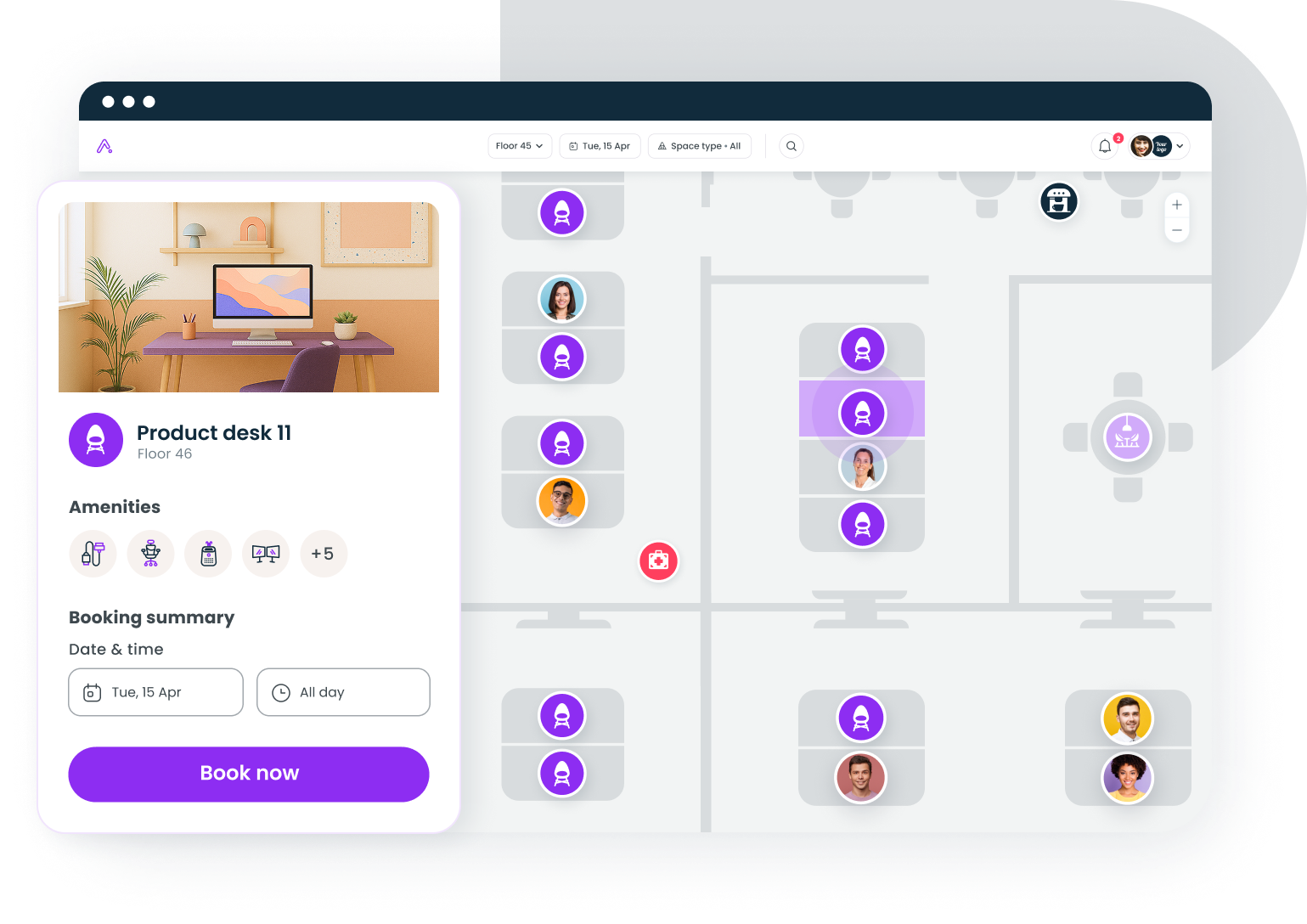
Increased collaboration across teams
When employees sit in the same spot every day, they interact primarily with the same neighbors. Desk sharing breaks these silos by rotating where people sit, which naturally encourages conversations and relationships across teams.
Many organizations take this further by using their desk booking software to show employees where their colleagues are sitting on a given day, making it easy to book a desk nearby for planned collaboration. Some platforms even include "invite" features where a manager can suggest desks near their team for important in-office days, creating intentional gathering moments without rigid mandates.
Research from Gallup shows that 83% of global employees prefer hybrid setups, and desk sharing is one of the key enablers that makes hybrid work functional. When employees know they can find a workspace near the people they need to collaborate with, they're more likely to come in with purpose rather than just checking a box.
How to calculate your desk sharing ratio
Your desk sharing ratio is the number of employees assigned per desk. Getting this number right is critical: too many desks and you're wasting money, too few and employees can't find a seat when they need one.
Understanding the desk sharing ratio
The standard formula is simple: total employees divided by total desks. If you have 200 employees and 100 desks, your desk sharing ratio is 2:1, meaning two employees share each desk.
Most organizations implementing desk sharing for the first time start with a conservative ratio between 1.2:1 and 1.5:1. More mature programs, especially those with robust hybrid work schedules, often operate at 1.5:1 to 2.0:1. According to JLL's real estate research, 60% of North American companies have adopted some form of desk sharing, with average ratios of 2.3 employees per desk.
How to find the right ratio for your organization
Don't pick a ratio based on industry benchmarks alone. Your ratio should reflect your actual occupancy patterns. Here's how to calculate it:
Start by measuring your current office occupancy over 4-8 weeks. Track how many employees are in the office each day, noting peak days and low days. If your average daily occupancy is 55% with peaks at 75%, you know you need enough desks for 75% of your workforce on the busiest days, plus a small buffer (typically 10-15%) for unexpected spikes.
For a 200-person team with 75% peak occupancy and a 10% buffer, that's 165 desks, giving you a desk sharing ratio of roughly 1.2:1. As employees become comfortable with the system and you gather more data, you can gradually increase the ratio.
Adjusting over time
Your desk sharing ratio isn't static. Review it quarterly based on booking data, employee feedback, and changes in your hybrid work policy. If you notice desks sitting empty regularly, you can increase the ratio. If employees consistently report difficulty finding seats on certain days, you might need to add more desks, adjust staggered schedules, or designate overflow areas.
How to create a desk sharing policy that works
A desk sharing policy is the rulebook that makes shared workspaces run smoothly. Without one, you'll end up with desk hoarding, cleanliness complaints, and frustrated employees who don't know what's expected. A clear desk sharing policy eliminates ambiguity and sets everyone up for success.
Booking and reservation rules
Spell out exactly how desk reservations work. Specify which desk booking system employees should use, how far in advance they can reserve (most companies allow 1-2 weeks ahead), and what happens if they don't show up for a reservation. Include auto-release policies where unredeemed bookings are released back into the pool after a set time, typically 30-60 minutes.
If your organization uses office hoteling, clarify whether employees can reserve the same desk repeatedly or if there are rotation requirements. Some companies cap consecutive bookings at the same desk to prevent de facto desk assignment.
Gable's space scheduling platform gives your team real-time desk booking, automated check-ins, and space utilization dashboards that make desk sharing simple to manage at scale.
Learn more
Shared desk etiquette and cleaning standards
This is where most desk sharing programs succeed or fail. Employees need clear expectations about how to leave a desk for the next person. Your etiquette guidelines should cover:
Clean desk standards: require employees to wipe down surfaces, keyboards, and mice with provided disinfectant wipes before leaving. Place sanitizer stations and cleaning supplies at every desk cluster so compliance is easy.
Personal belongings: nothing should be left on a shared desk at the end of the day. Provide adequate locker storage, ideally tiered options from small day-use lockers to larger multi-day options, so employees have somewhere to store personal items, chargers, and work materials.
Noise awareness: especially important in open desk areas. Define which zones are for quiet focused work and which allow conversations and phone calls. Employees making private calls should use phone booths or designated call areas rather than open desks.
Technology and equipment standards
Desk sharing only works when employees can sit down and start working immediately, regardless of which desk they choose. This means standardizing your technology setup across all workstations.
Every shared desk should have: reliable high-speed WiFi, a power outlet and USB charging, a standardized monitor connection (USB-C or HDMI), and access to shared printers and scanners. If your team uses a BYOD (bring your own device) approach, make sure every desk supports plug-and-play setup so employees aren't wasting 10 minutes configuring connections.
For specialized roles that need specific equipment, like dual monitors, drawing tablets, or lab equipment, designate specific desks with these resources and make them bookable through your desk booking system so employees can filter by amenity when reserving.
Communication and change management
Don't just publish a policy and expect adoption. Implementing desk sharing is a cultural change, and it requires communication. Explain why the company is moving to desk sharing (cost savings, better space utilization, more flexibility), address common concerns directly, and give employees a voice through surveys and feedback channels.
Start with a pilot program in one department or on one floor. Let early adopters work through the kinks, gather their employee feedback, and refine the policy before rolling it out company-wide. This phased approach builds internal advocates who can help others adjust.
Desk sharing challenges and how to solve them
No workplace model is perfect, and desk sharing comes with real challenges. The good news is that every common challenge has a proven solution. Here's what to expect and how to handle it.
Loss of personal space and ownership
For employees who've had the same desk for years, losing that personal space feels significant. Not everyone adjusts easily to working from a different spot each day, and some employees genuinely miss having a place to call their own.
The fix isn't to dismiss the concern; it's to replace it with something better. Provide personal lockers where employees can store their favorite mug, photos, or work materials. Let them personalize their locker space. And make sure the shared desks themselves are comfortable and well-equipped so the experience of sitting down at any desk is consistently positive.
For employees who truly need a permanent desk, like those with ergonomic accommodations, medical needs, or roles requiring specialized equipment, build in exceptions. Not everyone needs to participate in desk sharing for the model to work. The goal is optimizing space for the majority while accommodating those with specific needs.
Difficulty finding available desks
If employees regularly struggle to find an available desk, your desk sharing ratio is too aggressive or your booking system isn't working properly. This is the fastest way to kill employee buy-in.
Solutions include implementing a desk booking system with real-time availability so employees can check before commuting, setting maximum reservation windows to prevent desk hoarding, and using data from your workplace management software to identify peak days and adjust policies accordingly. Some organizations stagger in-office days by team to distribute demand more evenly across the week.
Interactive floor maps that show desk availability at a glance are particularly effective. When employees can open an app, see exactly which desks are free, and reserve one in seconds, the friction of desk sharing nearly disappears.
Hygiene and cleanliness concerns
Sharing desks means sharing surfaces, and post-pandemic, hygiene concerns are legitimate. Employees want to know the desk they're sitting at is clean.
Solve this with a combination of policy and infrastructure. Make cleaning supplies visible and accessible at every desk cluster, not locked in a supply closet. Implement clean-desk check-out procedures, either manual (signage reminding employees to wipe down before leaving) or automated (check-out prompts in your booking app). Schedule professional deep cleaning of all desks on a regular cycle, and communicate that schedule to employees.
Noise management in shared spaces
Open desk environments can get noisy, and not everyone is doing the same type of work. The employee on a client call doesn't want to sit next to a group brainstorming session.
Designated workspace zones solve most noise issues. Create clearly labeled quiet areas where conversations are discouraged, collaborative zones where talking is expected, and provide enough phone booths and small meeting rooms for private calls. Your desk booking app should let employees filter desks by zone type so they can match their workspace to their work for the day.
Technology inconsistency
Nothing frustrates employees faster than sitting at a desk where the monitor doesn't work, the WiFi is spotty, or they can't find a power adapter. Every negative technology experience at a shared desk reinforces the argument for assigned seating.
Standardize equipment across all desks, implement regular IT checks of shared workstations, and create a simple reporting system (a QR code at each desk that opens a maintenance ticket, for example) so issues get flagged and fixed quickly. The goal is ensuring the system runs smoothly regardless of which desk an employee chooses.
Desk sharing vs. hot desking: what's the difference?
These terms get used interchangeably, but they describe different things. Desk sharing is the broader concept: any workplace model where employees share workstations rather than having permanently assigned desks. Hot desking is one specific type of desk sharing.
In a hot desking setup, there's no reservation system. Employees arrive and pick any open desk, first come, first served. It's the simplest version of desk sharing to implement because it requires minimal technology, but it also gives employees the least control.
Desk sharing as a category also includes desk hoteling (with reservations), activity-based working (zone-based), and hybrid models that combine elements of each. Most organizations that start with hot desking eventually move to a reservation-based system because employees prefer knowing they have a desk waiting for them, and workplace teams need the booking data for space planning.
For a deeper comparison, see our guide to hot desking vs. hoteling and how each model fits different workplace strategies.
Technology you need for successful desk sharing
You can technically run desk sharing with a spreadsheet and a floor plan, but you won't want to. The right technology stack eliminates friction for employees and gives workplace teams the data they need to optimize continuously.
Desk booking software
This is the foundation. A good desk booking platform should include real-time desk availability maps, advance reservation capabilities, integration with Slack, Microsoft Teams, and calendar tools, automatic check-in and no-show release, and space utilization analytics.
Look for platforms that combine desk booking with meeting room booking and visitor management in a single system. Managing three separate tools for three related functions creates unnecessary complexity and gaps in your data.
Space utilization analytics
Data is what separates successful desk sharing from chaos. Your analytics should track daily and weekly occupancy patterns, desk utilization by zone, floor, and building, peak usage days and times, and booking-to-attendance ratios (how often reserved desks actually get used).
This data feeds directly into real estate decisions. When you can show leadership that the third floor averages 35% utilization, you have a strong case for consolidating space. When a new market shows consistently high demand for on-demand workspace, you have evidence to support expanding there.
Integration with existing workplace tools
Desk sharing technology should fit into your employees' existing workflow, not create a new one. The best platforms integrate with communication tools (Slack, Teams), calendar tools (Google Calendar, Outlook), access control systems (badge readers, digital locks), and HR systems (for org structure and team mapping).
When an employee can book a desk from Slack in 10 seconds, they'll actually use the system. When it requires logging into a separate app, navigating a complex interface, and confirming through email, adoption drops sharply.
Conclusion
Desk sharing isn't just about saving money on real estate, though it certainly does that. It's about building a workplace that matches how people actually work today. Hybrid employees don't need a permanent desk collecting dust four days a week. They need the right workspace, in the right location, when they need it.
The organizations getting desk sharing right are the ones that combine clear policies, the right technology, and a commitment to employee feedback. They measure what matters (utilization, satisfaction, collaboration), iterate based on data, and treat desk sharing as an ongoing program rather than a one-time office redesign.
Whether you're just exploring the concept or ready to scale an existing desk sharing program, the fundamentals remain the same: understand your occupancy patterns, choose the right model, invest in booking technology that employees will actually use, and build a desk sharing policy that sets clear expectations while maintaining flexibility.
Gable gives you everything you need to launch and manage desk sharing, from desk booking and space analytics to on-demand workspace access for distributed teams.
Get a demo