


.svg)


.svg)
Your front desk staff just spent another morning digging through a pile of packages to find one urgent delivery, while employees keep asking about items that arrived days ago. Sound familiar? If mailroom clutter is eating up valuable time and creating friction across your organization, you're not alone.
With U.S. parcel volume reaching 22.4 billion shipments in 2024, according to the Pitney Bowes Parcel Shipping Index, managing incoming packages has become a significant operational challenge. Add hybrid work schedules to the mix, and traditional mailroom operations simply can't keep up.
The right mailroom management software transforms this daily headache into a streamlined process that automatically matches recipients to packages, sends instant notifications, and gives you full visibility into every delivery. This guide breaks down what to look for, the key features that matter most, and how to evaluate your options so you can choose the best mailroom management software for your organization.
What is mailroom management software?
Mailroom management software automates the process of receiving, tracking, and distributing incoming mail and packages within an organization. Instead of manually logging deliveries in spreadsheets or relying on sticky notes, this management software uses technology to scan packages, identify recipients, and notify employees when their items arrive.
Modern mailroom management systems typically include mobile device scanning capabilities, automated notifications through email or workplace tools like Slack and Teams, digital delivery logs, and reporting features that help you understand delivery patterns across multiple locations. The goal is simple: ensure every package reaches its intended recipient quickly while eliminating the manual entry and guesswork that plague traditional mailrooms.
For workplace leaders managing hybrid office operations, mailroom automation has become essential. When employees split time between home and office, packages can sit unclaimed for days, creating storage challenges and security concerns. Digital mailroom software bridges this gap by keeping everyone informed regardless of where they're working.
Why your workplace needs mailroom management software
The case for investing in mailroom software goes beyond convenience. Here's what the data tells us about the current landscape:
Package volumes continue climbing. The Pitney Bowes research projects U.S. parcel volume will reach 30.5 billion by 2030, growing at approximately 5% annually. Every package that enters your building requires handling, tracking, and delivery to its recipient.
Theft risk is significant. According to Security.org's 2025 Package Theft Report, one in four Americans has been a victim of package theft, with an estimated 37 million packages stolen annually, totaling over $8 billion in merchandise. While workplace deliveries are safer than home deliveries, the potential for lost packages inside your organization creates its own set of problems.
Manual processes drain resources. Front desk staff and mailroom employees spend hours on tasks that could be automated: logging packages that arrive, tracking down recipients, following up on unclaimed items, and managing the clutter that accumulates when packages sit awaiting pickup.
Hybrid offices create coordination challenges. With employees coming into the office on different days, traditional mailroom operations that assumed people would be on-site don't work anymore. Packages need hybrid work technologythat reaches recipients wherever they're working.
The bottom line: mailroom management software isn't just about handling packages more efficiently. It's about improving efficiency across your entire front desk operation while creating a better experience for employees who rely on workplace deliveries.

Managing packages doesn't have to drain your team's time. Learn how modern mailroom best practices can reduce clutter, speed up deliveries, and free your front desk staff to focus on what matters.
Read the guide
Key features to look for in the best mailroom management software
Not all mailroom software solutions are created equal. When evaluating options, focus on these essential capabilities that separate excellent mailroom management from basic package tracking:
Package scanning and automatic recipient matching
The foundation of any mailroom management system is the ability to quickly scan packages and automatically match them to recipients. The best solutions let you simply scan a shipping label with a mobile device camera, then use OCR technology and your employee directory to identify who should receive the package.
Look for software that can handle damaged labels, handwritten addresses, and packages for multiple recipients. Integration with Active Directory or your HRIS system ensures recipient details stay current without manual updates.
Automated notifications and reminders
Once a package is logged, the system should immediately notify the recipient through their preferred channel. This might be email, text message, Slack, Microsoft Teams, or a mobile app notification. The key is meeting employees where they already work rather than forcing them to check another platform.
Equally important: automatic reminders for packages awaiting pickup. Without this feature, delivered packages pile up as employees forget or don't prioritize collection. The best mailroom software sends escalating reminders until items are picked up, keeping your mailroom clutter-free.
Real time tracking and digital delivery log
Full visibility into package status is essential for both administrators and employees. Staff should be able to quickly search for any package, see its current status, and access a complete history of when it arrived and who picked it up.
This digital delivery log serves multiple purposes: it helps resolve disputes about whether packages actually arrived, provides an audit trail for secure deliveries, and generates data you can use to understand delivery patterns and optimize operations.
Multi-location support
Organizations with offices across multiple locations need mailroom tracking software that scales. The system should allow you to manage deliveries at each site while providing consolidated reporting across your entire portfolio.
This becomes especially valuable for workplace leaders making decisions about office space optimization. Understanding package volume by location helps inform real estate decisions and staffing requirements.
Integration with workplace systems
Mailroom management doesn't exist in isolation. The best solutions integrate with your existing workplace technology stack, including visitor management systems, access control, calendar applications, and communication tools.
For example, integration with visitor management can streamline the experience when couriers arrive, while connection to Google Workspace or Microsoft 365 helps coordinate deliveries with employee schedules.
Minimal training requirements
Any software you implement should be intuitive enough that front desk staff and mailroom employees can use it effectively with minimal training. Complex systems that require extensive onboarding will face adoption challenges and may not deliver the efficiency gains you're looking for.
Mobile-first design is particularly important here. Staff should be able to scan packages and manage deliveries from any mobile device without needing extra hardware or specialized equipment.
How to evaluate mailroom management software for your organization
Choosing the right solution requires understanding your specific needs and matching them to available options. Here's a framework for evaluation:
Assess your current mailroom operations
Start by documenting how packages currently flow through your organization:
How many packages arrive daily at each location? What's the typical time between package arrival and recipient pickup? How much time does staff spend on manual entry and notification? What problems occur most frequently (lost packages, unclaimed items, recipient confusion)? How do hybrid schedules affect package handling?
This baseline helps you identify which features will deliver the most value and provides metrics to measure improvement after implementation.
Define your requirements
Based on your assessment, prioritize the features that matter most. Small offices might need simple package intake and notification capabilities, while larger organizations require sophisticated workflows, access controls, and reporting.
Consider how the software will integrate with your existing tools. If your team lives in Slack or Microsoft Teams, native integration with those platforms should be a requirement rather than a nice-to-have.
Evaluate user experience
Request demos from multiple vendors and pay attention to the actual user experience. How easy is it to scan packages and match them to recipients? Can you quickly search for items and view their status? Does the mobile app work smoothly on common devices?
Remember that your front desk staff will use this software dozens of times daily. Even small friction points add up over time and can undermine adoption.
Consider total cost of ownership
Pricing models vary significantly across mailroom software vendors. Some charge per location, others per user or per package scanned. Make sure you understand the full cost including implementation, training, and ongoing support.
Also consider whether the solution requires dedicated hardware like barcode scanners or works with standard mobile devices. Hardware requirements add to upfront costs and ongoing maintenance.
Check security and compliance
For organizations handling sensitive deliveries or operating in regulated industries, security features matter. Look for role-based access controls, audit logging, and compliance with relevant standards.
The software should also help you maintain secure deliveries by verifying requirements at pickup, such as signature capture, photo documentation, or badge scanning.
Gable's mailroom management solution automates package tracking, sends instant notifications, and gives you complete visibility across all your locations. No extra hardware required.
Learn more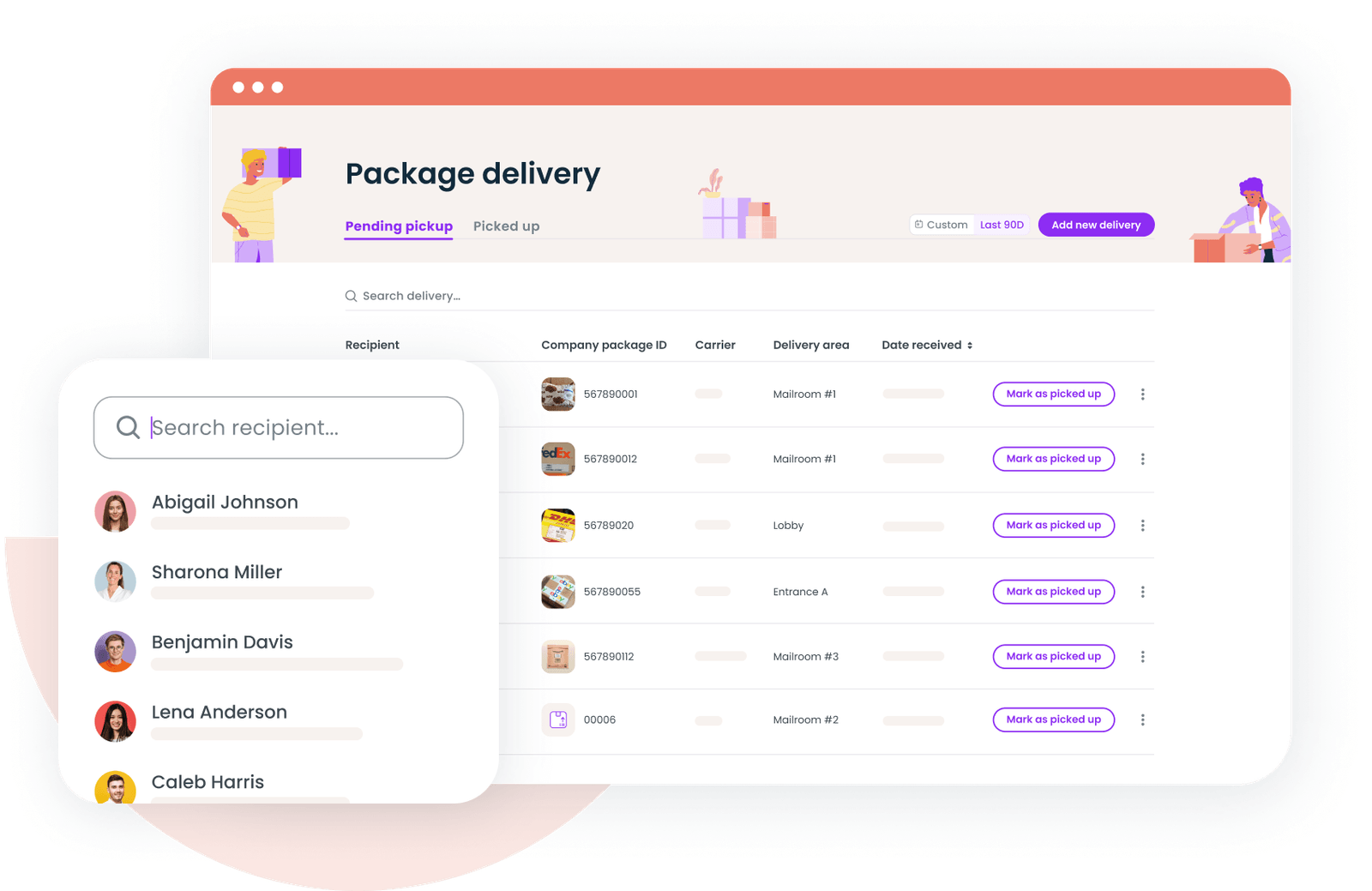
Best practices for implementing mailroom management software
Successfully deploying mailroom software requires more than just selecting a vendor. These best practices will help ensure a smooth rollout:
Plan your data migration
If you're moving from spreadsheets or a legacy system, plan how existing package records will transfer to the new platform. Clean up your recipient data before migration to avoid importing outdated employee information.
Train all stakeholders
While the software should be intuitive, everyone who interacts with it needs to understand the new workflows. This includes front desk staff who process packages, employees who receive delivery notifications, and administrators who manage the system.
Communicate the change
Let employees know what to expect before you go live. Explain how they'll be notified when packages arrive, where to pick them up, and how to mark items as collected. Clear communication drives adoption and reduces support requests.
Monitor and optimize
After launch, track key metrics like processing time per package, time to recipient notification, and average pickup time. Use this data to identify bottlenecks and refine your workflows.
Review reporting regularly to spot patterns, like peak delivery days that might benefit from additional staffing or specific locations that consistently have more unclaimed packages.
The role of mailroom software in hybrid offices
Hybrid work has fundamentally changed how organizations approach mailroom management. When the majority of companies now operate hybrid models, packages regularly arrive for employees who aren't on-site.
Effective mailroom software addresses this reality in several ways:
Proactive notifications reach employees anywhere. Rather than assuming someone will walk past the mailroom and see their package, automated processes push notifications to wherever employees are working. This is especially valuable for distributed workforce teams spread across locations.
Self-service options reduce dependency on staff. Employees can check their pending deliveries, view package details, and plan their pickup without requiring assistance from front desk personnel.
Data informs scheduling decisions. Package delivery patterns can help employees plan their office days. If someone knows an important delivery is arriving Thursday, they might coordinate their schedule accordingly.
Integration with space management creates efficiency. When mailroom software connects with desk booking and room scheduling tools, you create a more cohesive workplace experience. Employees can see their deliveries alongside their other workplace information in one place.
Companies like Ironclad have transformed their workplace into data-driven operations by connecting various workplace systems. Mailroom management is one piece of this larger puzzle, contributing to a holistic view of how people use physical workspace.
Making the final decision
After evaluating options and understanding your needs, the final decision often comes down to a few key factors:
Does the solution solve your specific pain points? Focus on the problems that cost you the most time and create the most friction. A feature-rich platform isn't valuable if it doesn't address what matters to your organization.
Can you see it working in your environment? During demos, visualize how the software would function with your actual package volumes, locations, and team. Ask vendors about organizations similar to yours.
What's the implementation timeline and support model? Understand how long deployment will take and what ongoing support looks like. Responsive vendor support is crucial when issues arise.
Does it fit within your broader workplace technology strategy? Mailroom management should complement your other workplace tools rather than creating another silo. Consider how the solution connects with your existing office management software and operational systems.
Discover how Gable helps workplace teams streamline package deliveries, manage visitors, and optimize desk and room bookings. Our platform is an all-in-one workplace management tool, underpinned by real-tme data, robust analytics, and AI.
Get a demo


